Piotnet Forms UTM Tracking Integration
Set up Piotnet Forms with HandL UTM Grabber to capture UTM parameters, GCLID, FBCLID, referrer, and landing page data in hidden fields for attribution.
Collecting UTMs in Piotnet with HandL UTM Grabber
UTM attribution overview
This guide explains Collecting UTMs in Piotnet with HandL UTM Grabber. It helps you capture UTM source, medium, campaign, term, content, click IDs, referrer, and landing page data and keep the marketing context needed for accurate reporting across forms, bookings, signups, and sales.
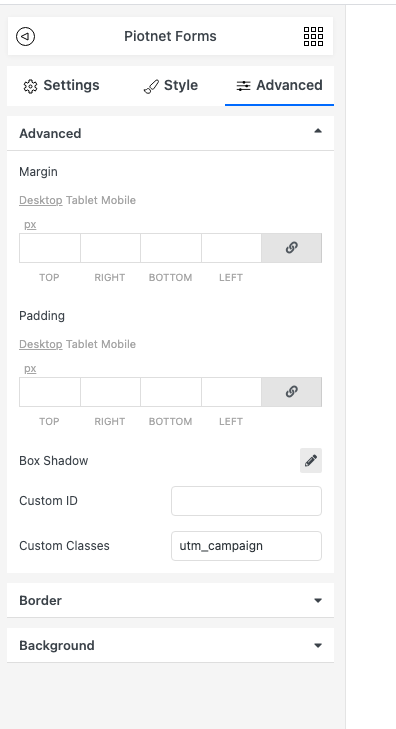
Assign custom classes for each field as it is shown above. Here we show only for utm_campaign, however this can be implemented for all the fields similarly.
Please see the list of parameters you can use here Native WP Shortcodes
Send Piotnet Forms UTMs via Zapier or Webhook
UTM attribution overview
This walkthrough covers sending full UTM Grabber data from Piotnet Forms to Zapier, Make, or your own webhook. Handy when you need gclid, fbclid, first-touch fields, or custom params alongside the lead or order.
For the primary setup, see the main Piotnet Forms guide.
When a webhook makes sense
Native fields in Piotnet Forms often stop at basic UTMs. A webhook lets you push everything UTM Grabber stores without trimming values or losing click IDs.
Thank-you page script
Paste this on your confirmation page. Swap in your Zapier or Make hook URL.
<script>
var qvars = {};
window.location.href.replace(/[?&]+([^=&]+)=([^&]*)/gi, function(m, key, value) {
    qvars[key] = decodeURIComponent(value.replace(/\+/g, ' '));
});
qvars = Object.assign({}, (typeof handl_utm !== 'undefined' ? handl_utm : {}), qvars);
setTimeout(function() {
    var data = new URLSearchParams(qvars).toString();
    var xmlHttp = new XMLHttpRequest();
    xmlHttp.open('GET', 'https://hooks.zapier.com/hooks/catch/YOUR_ID/YOUR_KEY/?' + data, true);
    xmlHttp.send(null);
}, 1000);
</script>
Full pattern explained in Triggering Zapier on Thank you Page.
Quick Zapier / Make checklist
- Create a Catch Hook trigger and copy the URL
- Run a test conversion with UTMs in the landing URL
- Confirm gclid, utm_source, and email (if present) show up in the payload
- Map fields into your CRM or spreadsheet
Parameter reference: Native WP Shortcodes.
Make users: see Make Integromat integration.