WooCommerce Request a Quote UTM Tracking Integration
Track campaign attribution through WooCommerce Request a Quote with HandL UTM Grabber, capturing UTM parameters, click IDs, and referrer data on quote requests.
- WooCommerce Request a Quote UTM Tracking Integration
- Send WooCommerce Request a Quote UTMs via Zapier or Webhook
WooCommerce Request a Quote UTM Tracking Integration
UTM attribution overview
This guide explains WooCommerce Request a Quote UTM Tracking Integration with HandL UTM Grabber. It helps you capture campaign attribution on checkouts, orders, quote requests, and ecommerce conversions and keep the marketing context needed for accurate reporting across forms, bookings, signups, and sales.
Overview
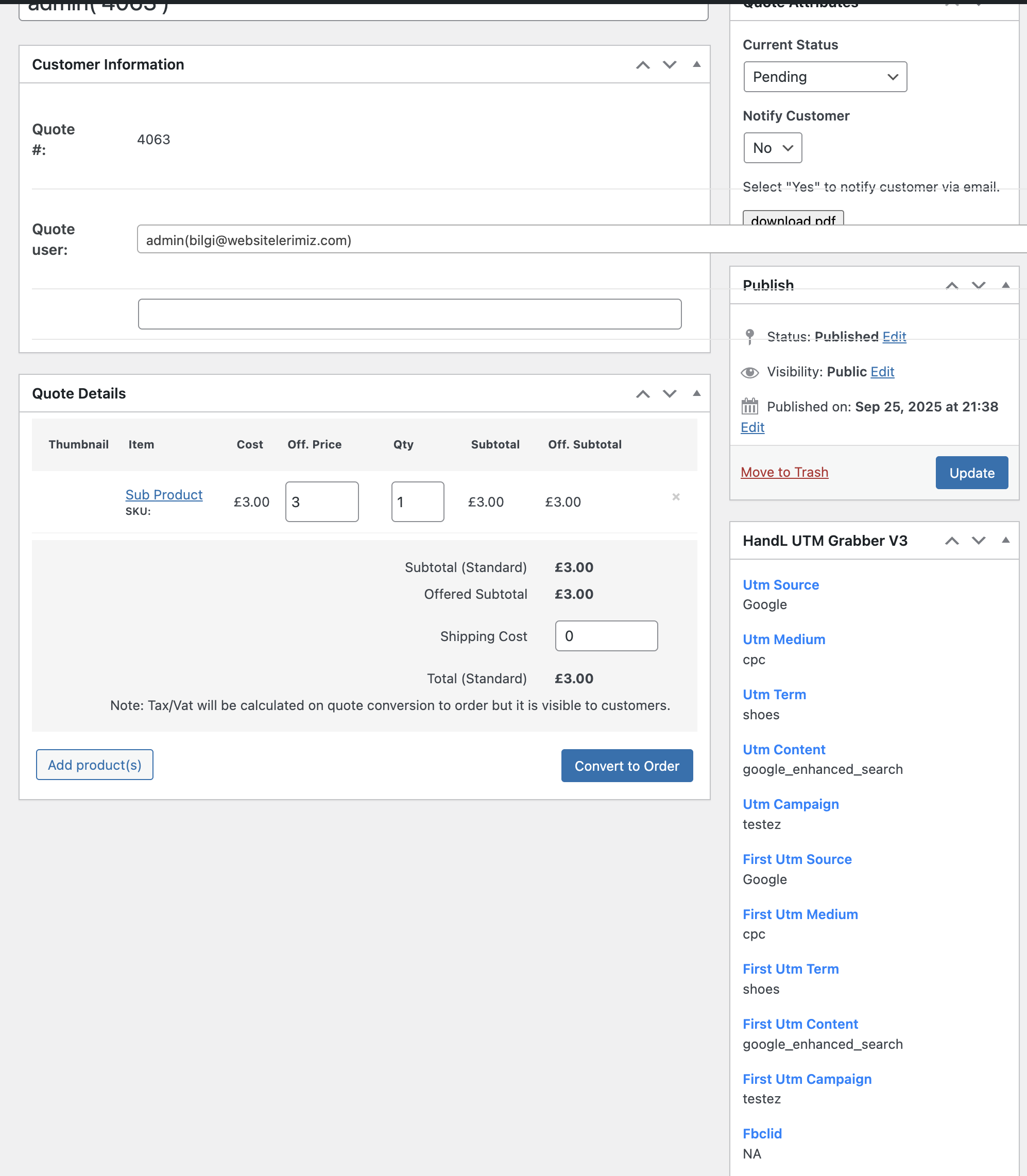
This integration adds UTM tracking capabilities to the WooCommerce Request a Quote plugin, allowing you to capture and store UTM parameters when customers submit quote requests.
Features
1. Hidden UTM Fields in Quote Form
- Automatically adds hidden UTM fields to the quote request form
- Fields are populated from cookies containing UTM data
- No visible impact on the user experience
2. UTM Data Storage
- Saves UTM parameters as quote meta data when quotes are submitted
- Stores data using the same field names as the main UTM Grabber plugin
- Compatible with existing UTM tracking infrastructure
3. Admin Interface Enhancements
- Adds UTM meta box to quote admin pages
- Displays UTM data in quote details
- Shows UTM columns in quote list view
- Includes UTM search functionality
4. Email Integration
- Option to include UTM data in admin notification emails
- Configurable via plugin settings
- Supports both HTML and plain text email formats
5. PDF Export Support
- UTM data is available for PDF generation
- Can be included in quote PDFs if needed
6. REST API Support
- UTM data is included in REST API responses
- Enables external systems to access UTM information
Installation
-
Ensure both plugins are active:
- HandL UTM Grabber V3
- WooCommerce Request a Quote
-
The integration is automatically loaded when both plugins are active
-
No additional configuration is required
Usage
For Site Administrators
-
View UTM Data in Quotes:
- Go to WooCommerce > Request a Quote > Quotes
- Click on any quote to view details
- UTM data will be displayed in the "HandL UTM Grabber V3" meta box
-
Search Quotes by UTM Data:
- In the quotes list, use the UTM search field
- Search by campaign, source, medium, or other UTM parameters
-
Configure Email Notifications:
- Go to HandL UTM Grabber V3 settings
- Enable "Append Quote Meta to Request a Quote Admin Emails"
- UTM data will be included in admin notification emails
Troubleshooting
Common Issues
-
UTM data not appearing:
- Check if UTM cookies are being set
- Verify JavaScript is loading on quote page
- Check browser console for errors
-
Admin columns not showing:
- Ensure you're viewing the quotes list page
- Check if the post type is
addify_quote - Verify plugin is active
-
Email data not included:
- Check plugin settings for email option
- Verify email template is using the data
- Check if the hook is firing
-
PHP Fatal Error: Call to a member function get() on null:
- This error occurs when background processes (like Yoast SEO indexing) try to load the quote template without a WooCommerce session
- The integration now includes safety checks to prevent this error
- If you still encounter this error, ensure both plugins are updated to their latest versions
-
PHP Fatal Error: call_user_func_array(): Argument #1 ($callback) must be a valid callback:
- This error occurs when WordPress tries to call a function that's not available in the current context
- The integration now ensures all functions are properly registered and available
- Functions include safety checks to prevent execution in inappropriate contexts
- AJAX requests are now properly handled to prevent callback errors during "Add to Quote" actions
Send WooCommerce Request a Quote UTMs via Zapier or Webhook
UTM attribution overview
This walkthrough covers sending full UTM Grabber data from WooCommerce Request a Quote to Zapier, Make, or your own webhook. Handy when you need gclid, fbclid, first-touch fields, or custom params alongside the lead or order.
For the primary setup, see the main WooCommerce Request a Quote guide.
When a webhook makes sense
Native fields in WooCommerce Request a Quote often stop at basic UTMs. A webhook lets you push everything UTM Grabber stores without trimming values or losing click IDs.
Thank-you page script
Paste this on your confirmation page. Swap in your Zapier or Make hook URL.
<script>
var qvars = {};
window.location.href.replace(/[?&]+([^=&]+)=([^&]*)/gi, function(m, key, value) {
    qvars[key] = decodeURIComponent(value.replace(/\+/g, ' '));
});
qvars = Object.assign({}, (typeof handl_utm !== 'undefined' ? handl_utm : {}), qvars);
setTimeout(function() {
    var data = new URLSearchParams(qvars).toString();
    var xmlHttp = new XMLHttpRequest();
    xmlHttp.open('GET', 'https://hooks.zapier.com/hooks/catch/YOUR_ID/YOUR_KEY/?' + data, true);
    xmlHttp.send(null);
}, 1000);
</script>
Full pattern explained in Triggering Zapier on Thank you Page.
Quick Zapier / Make checklist
- Create a Catch Hook trigger and copy the URL
- Run a test conversion with UTMs in the landing URL
- Confirm gclid, utm_source, and email (if present) show up in the payload
- Map fields into your CRM or spreadsheet
Parameter reference: Native WP Shortcodes.
Make users: see Make Integromat integration.