# Zoho Form: Embed forms using JavaScript - HandL UTM Grabber Guide

## UTM attribution overview

This guide explains Zoho Form: Embed forms using JavaScript - HandL UTM Grabber Guide. It helps you pass lead attribution into your CRM, email platform, or marketing automation workflow and keep the marketing context needed for accurate reporting across forms, bookings, signups, and sales.

##### We are showing JavaScript method here but this can be implemented similarly to iframe as well. We prefered JavaScript because Zoho Forms are responsive only when JavaScript method is used.

##### Let's get started...

##### All the UTM fields are automatically added to your forms by Zoho, so you do not need to anything there. However, if you would like to add other custom parameters such as gclid, referrer url, IP ( you can find the full list here [Native WP Shortcodes](https://docs.utmgrabber.com/books/101-getting-started-for-handl-utm-grabber-v3/page/native-wp-shortcodes) ). You need to create cutom fields in Zoho.

[![](https://docs.utmgrabber.com/uploads/images/gallery/2021-10/scaled-1680-/image-1633928912831.png)](https://docs.utmgrabber.com/uploads/images/gallery/2021-10/image-1633928912831.png)
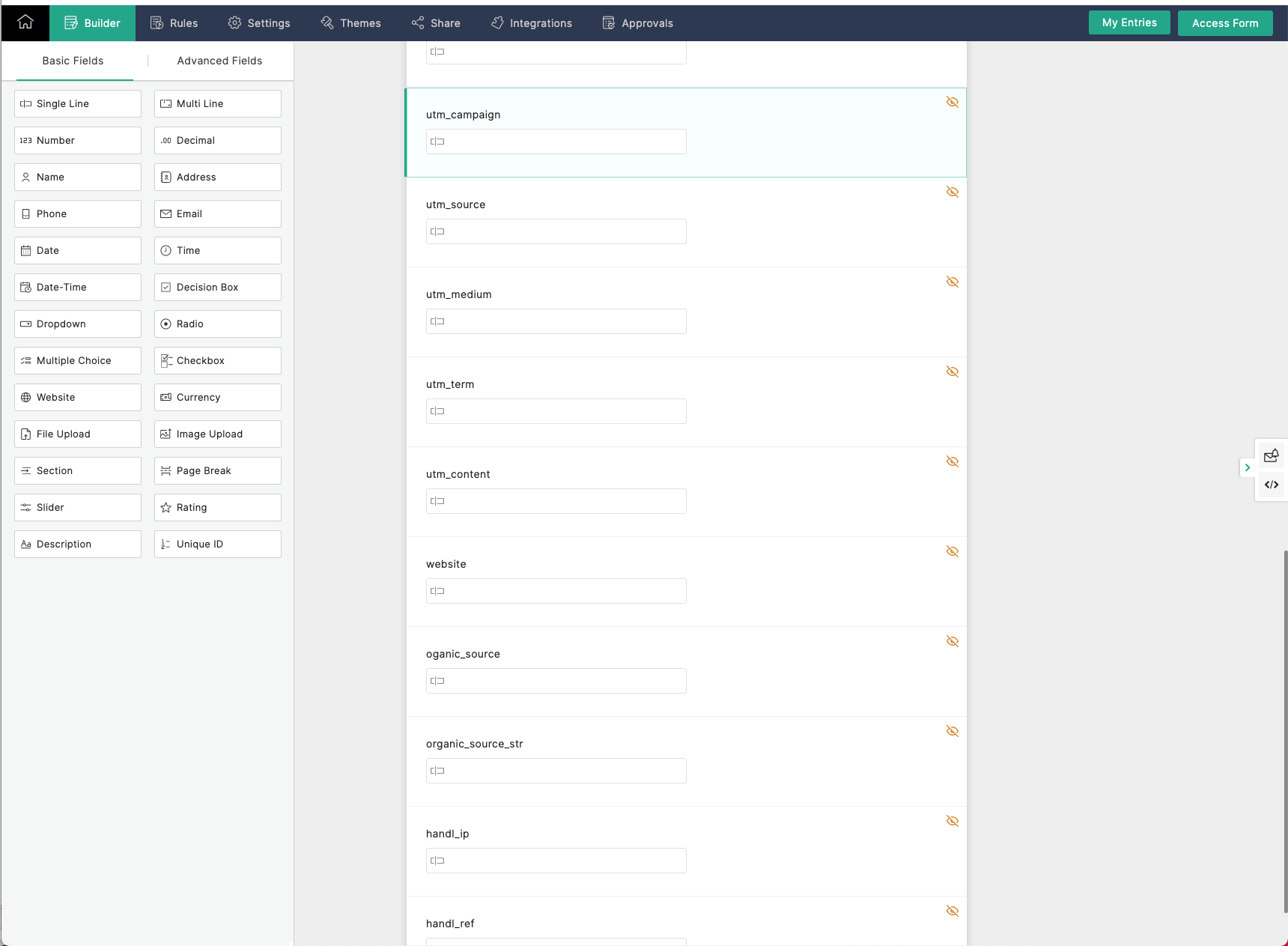

##### Luckily Zoho has nice documentation about this (this may NOT needed), [see here]( https://www.zoho.com/forms/help/share/embed.html). Scroll down to `B. Include URL Parameters` section. 

##### Go ahead and make sure the names are exactly matching with our parameter name (e.g. for parameter `handl_url`, use custom arguments as `handl_url`)

##### After you added all the custom parameters.

##### You need to add custom alias as it is [shown here](https://www.zoho.com/forms/help/settings/field-alias.html). Again, please make sure the names are exactly matching with our parameter name.

[![](https://docs.utmgrabber.com/uploads/images/gallery/2021-10/scaled-1680-/image-1633928939130.png)](https://docs.utmgrabber.com/uploads/images/gallery/2021-10/image-1633928939130.png)
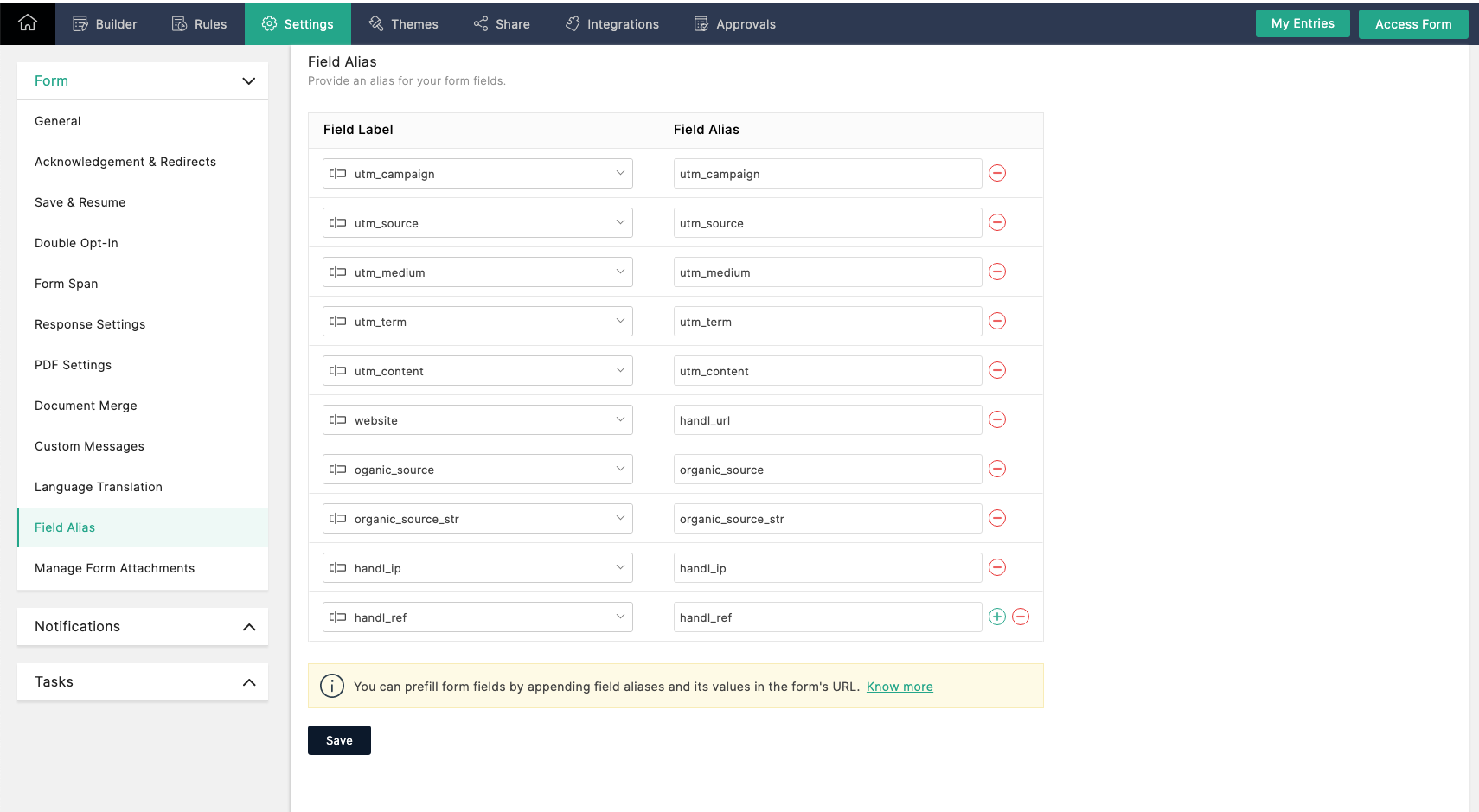

##### After that, grab your JavaScript code which will look like this.

```
<div id="zf_div_S0FmcxXFD6rp1sa10asdzIDI1cBtgsiSNObWFaW1kM"></div><script type="text/javascript">(function() {
try{
var f = document.createElement("iframe");   
f.src ="https://forms.zohopublic.com/your/form/path";
f.style.border="none";                                           
f.style.height="721px";
f.style.width="90%";
f.style.transition="all 0.5s ease";// No I18N
var d = document.getElementById("zf_div_S0FmcxXFD6rp1sa10asdzIDI1cBtgsiSNObWFaW1kM");
d.appendChild(f);
window.addEventListener('message', function (){
var zf_ifrm_data = event.data.split("|");
var zf_perma = zf_ifrm_data[0];
var zf_ifrm_ht_nw = ( parseInt(zf_ifrm_data[1], 10) + 15 ) + "px";
var iframe = document.getElementById("zf_div_S0FmcxXFD6rp1sa10asdzIDI1cBtgsiSNObWFaW1kM").getElementsByTagName("iframe")[0];
if ( (iframe.src).indexOf('formperma') > 0 && (iframe.src).indexOf(zf_perma) > 0 ) {
var prevIframeHeight = iframe.style.height;
if ( prevIframeHeight != zf_ifrm_ht_nw ) {
iframe.style.height = zf_ifrm_ht_nw;
}   
}
}, false);
}catch(e){}
})();</script>
```

##### and simply add one line code there just like shown below

```
<div id="zf_div_S0FmcxXFD6rp1sa10asdzIDI1cBtgsiSNObWFaW1kM"></div><script type="text/javascript">(function() {
try{
var f = document.createElement("iframe");   
f.src ="https://forms.zohopublic.com/your/form/path";
f.classList.add('utm-src')
f.style.border="none";                                           
f.style.height="721px";
f.style.width="90%";
f.style.transition="all 0.5s ease";// No I18N
var d = document.getElementById("zf_div_S0FmcxXFD6rp1sa10asdzIDI1cBtgsiSNObWFaW1kM");
d.appendChild(f);
window.addEventListener('message', function (){
var zf_ifrm_data = event.data.split("|");
var zf_perma = zf_ifrm_data[0];
var zf_ifrm_ht_nw = ( parseInt(zf_ifrm_data[1], 10) + 15 ) + "px";
var iframe = document.getElementById("zf_div_S0FmcxXFD6rp1sa10asdzIDI1cBtgsiSNObWFaW1kM").getElementsByTagName("iframe")[0];
if ( (iframe.src).indexOf('formperma') > 0 && (iframe.src).indexOf(zf_perma) > 0 ) {
var prevIframeHeight = iframe.style.height;
if ( prevIframeHeight != zf_ifrm_ht_nw ) {
iframe.style.height = zf_ifrm_ht_nw;
}   
}
}, false);
}catch(e){}
})();</script>
```

##### Notice we just added `f.classList.add('utm-src')` the above form. Now you should be set collecting all the UTMs and custom parameters in your Zoho Forms.