
How to Track UTMs in Marketo form
UTM attribution overview
This guide explains How to Track UTMs in Marketo form with HandL UTM Grabber. It helps you pass lead attribution into your CRM, email platform, or marketing automation workflow and keep the marketing context needed for accurate reporting across forms, bookings, signups, and sales.
Our plugin supports Marketo forms out of the box, just make sure the UTM fields are added to your form and the naming convention matches with our plugin.
For example:
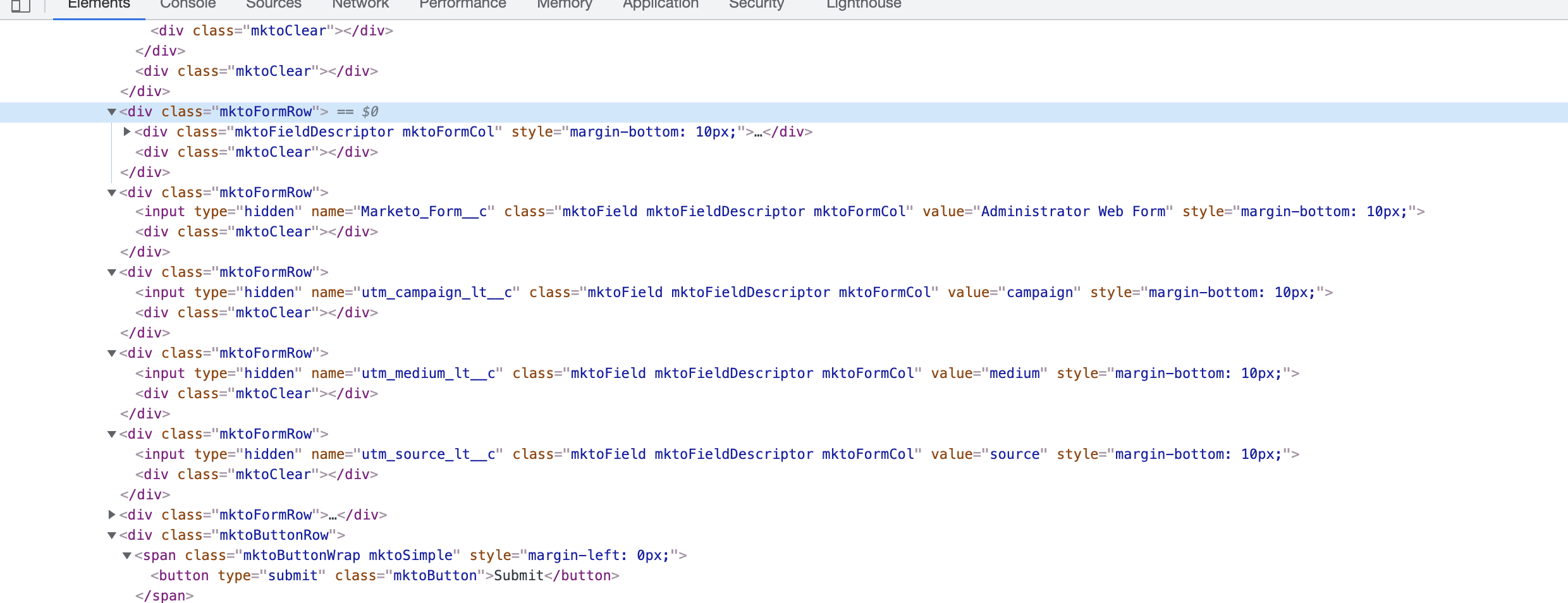
As you can see in the picture above, traffic with UTM values will prefill the hidden fields in your form and they will be submitted along with the other prospect data.
Incase your form does not track the UTMs, do the following
Replace this
<script src="//app-ab43.marketo.com/js/forms2/js/forms2.min.js"></script>
<form id="mktoForm_1000"></form>
<script>MktoForms2.loadForm("//app-ab43.marketo.com", "<some id>", 1000);</script>
to
<script src="//app-ab43.marketo.com/js/forms2/js/forms2.min.js"></script>
<form id="mktoForm_1000"></form>
<script>
MktoForms2.loadForm("//app-ab43.marketo.com", "<some id>", 1000);
MktoForms2.whenReady(function (form) {
    jQuery.each(handl_utm_all_params, function( i,v ) {
		var curval = decodeURI(Cookies.get(v))
		if (curval != 'undefined') {
			jQuery("[name*="+v+"]").val(curval)
		}
	});
});
</script>